
Trying out WPSD on a DV hotspot
A hotspot typically lets you get onto internet trunked amateur radio1 using the digital handheld you already have. There are many ways to do this, but a popular way is to use a Raspberry Pi, a MMDVM board and something like Pi-Star to tie it all together. My Pi-Star unit works well enough, this post is about trying out a different way of doing the same thing, using WPSD, since Pi-Star went through a pause in development for a year or so.
The handheld has to be a digital voice mode radio, not a standard analogue rig. Typical cheap hotspot boards like the MMDVM only take the already encoded digital voice signal from your handheld and route that to wherever you want to go. A little bit more on the confusion that is digital voice in amateur radio - hotspots can reunify the three main amateur DV modes and interwork, which is A Good Thing. I am using Yaesu Fusion, but a hotspot can take any of the commonly used DV modes.
In the end this is about the UI, you can do pretty much anything you can do on the Pi-Star with WPSD and vice-versa. Pi-Star tolerates low-end hardware better - my Pi-Star is on a Pi Zero W, whereas WPSD requires a Pi Zero 2 W. Apparently you can run WPSD on a Zero W2, but it runs exceedingly slo-o-o-o-w. So if you want to run your hotspot on old hand-me-downs, go with Pi-Star
I used a Raspberry Pi 3, initially scavenging the MMDVM board from the old Pi-Star to establish that WPSD would work. It did, so it was time to buy a generic MMDVM board from Amazon, £21 delivered.
Installing WPSD was reasonably straightforward, I used Raspberry Pi Imager which handled the xz compressed image just fine. Because I was using wifi I used the wifi configurator otherwise you’d have to wait for the hotspot to appear as a connectable wifi access point and set up your wifi that way
Watch the display pins don’t foul the GPIO on a regular Pi
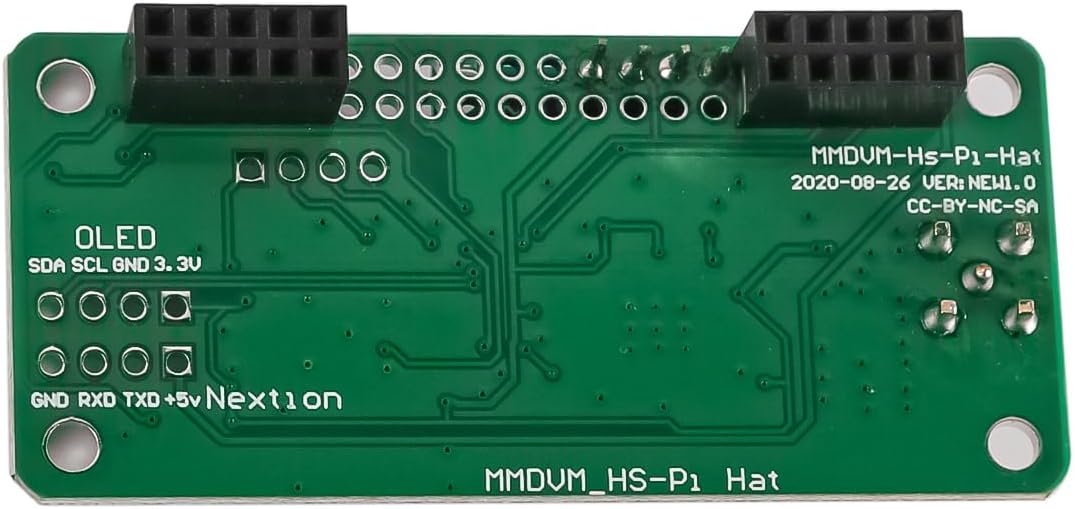
If you get an MMDVM Pi Hat with a display, then you may find the display pins stick down through the board. I couldn’t convince myself these wouldn’t foul the GPIO pins on a regular pi so I cut them flush with the PCB. For all I know they have carefully set things up so this isn’t a problem, but I just didn’t feel lucky here. There’s enough gap once cut flush.
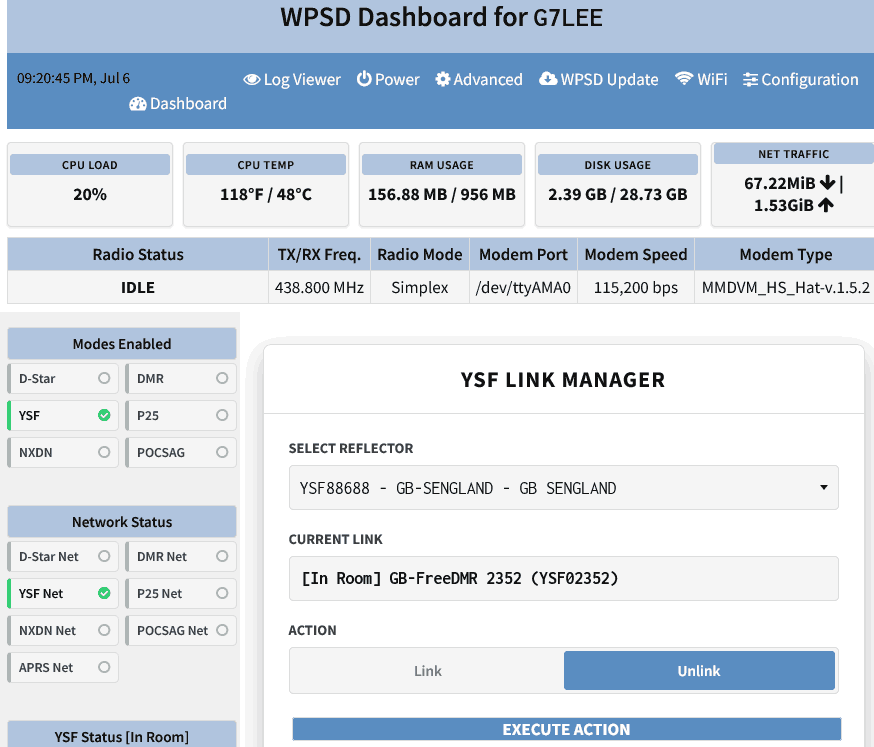
The user interface is cleaner that Pi-Star’s, and there are some nice touches. I always select the talkgroup on the web UI, you can sometimes do it with your radio but paging through screeds of talkgroups isn’t particularly my idea of fun. WPSD has a search box that comes up on the select reflector, if you know the ysf number you want, keying that in gets you there a whole lot faster that using the drop down list.
WPSD was more responsive, but I am sure if I put Pi-star on a Pi 3 rather than the to the Pi Zero W it would be faster so I’m not going to moan about that. I was tempted to change the Pi Zero W for a Pi Zero 2 W but they’re not to be had for love nor money at the time of writing, presumably outcompeted for silicon by the AI hyperscalars.
I had a QSO with John M7HYJ in Stoke on Trent via HUBnet and I can’t really argue with the performance. Digital sounds a bit rough and watery compared to analogue, but that’s just the nature of the beast, if you want better signal quality then skip the digital voice radio AMBE codec malarkey and use Zello or Peanut local channels. Still digital voice but not hamstrung by ultra low bandwidth and the AMBE codec. Of course you then may as well use Zoom or MS Teams ;)
select YSF reflectors from the radio using DG-ID
There is something nice about being able to use your handheld to select channels/rooms/reflectors rather than your computer. However, changing YSF rooms is done from the computer by default. WPSD can map a DG-ID3 to YSF rooms and switch this from the radio, read about it here
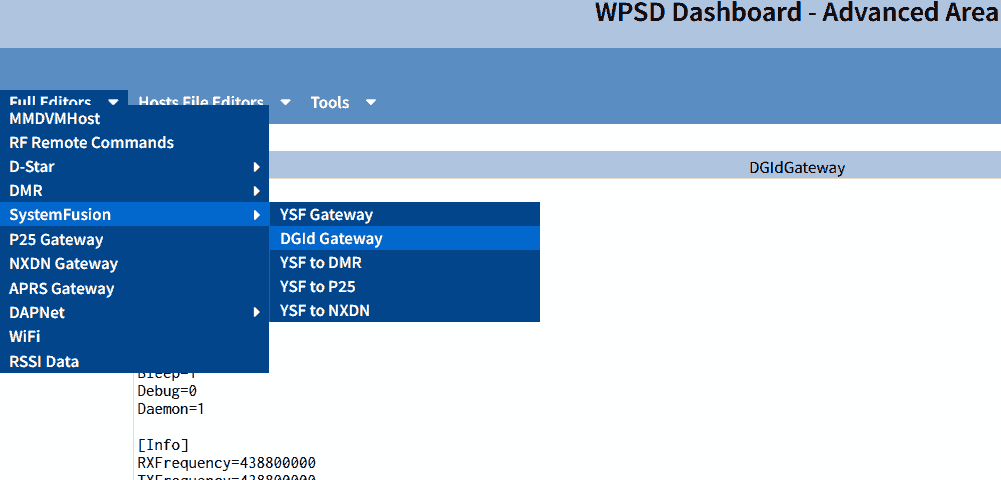
I found this hard to make happen. You have to go into dashboard, and select advanced. From there you have to select Full Editors -> SystemFusion -> DGid Gateway
The idea here is that WPSD listens for incoming signals, and if DG-ID is set to something it recognises in the map, it selects that channel. There are two problems with this. The hotspot is a simplex device, it can only hear your desire to change YSF if it is not transmitting. The other is that you have no visible or audible feedback that this has happened. There is a settable timeout, after which the system reverts to default. It’s all a bit hit and miss, and because of the way it works you will easily be that kerchunker on the active channel, if any ;)
In this file there will only be an entry for DGID-0 in the text file. I changed this to
[DGId=0]
Port=42025
Local=42026
Type=Gateway
Static=1
Address=127.0.0.1
RFHangTime=30
NetHangTime=30
Debug=0

[DGId=1]
Type=Parrot
Static=0
Address=127.0.0.1
Port=42012
Local=42013
RFHangTime=15
NetHangTime=15
Debug=0

[DGId=14]
Type=YSF
Static=0
Name=GB-HUBnet
Port=42014
Local=42015
RFHangTime=15
NetHangTime=15
Debug=0

[DGId=21]
Type=YSF
Static=0
Name=GB-CQ-UK
Port=42021
Local=42022
RFHangTime=15
NetHangTime=15
Debug=0

[DGId=88]
Type=YSF
Static=0
Name=GB-SENGLAND
Port=42088
Local=42089
RFHangTime=15
NetHangTime=15
Debug=0
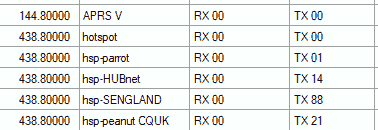
I have to admit I don’t know if the fiddling with ports is necessary. The names are taken from the dropdown menu if YSF manager, I was unable to use the YSF reflector numbers here. I can select YSF reflectors by keying up with the TX-ID set to 1,14,21 or 88, and they stay on the reflector for 15 seconds as specified. You can see this at the bottom left
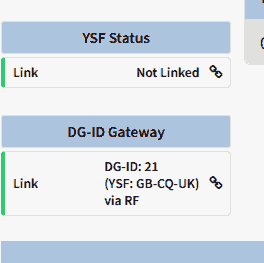
Switched via RF and DG-ID
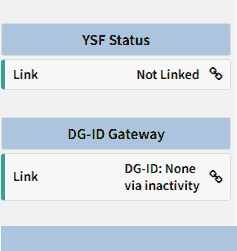
Reverted
I used different memories to set up the TX-IDs, though I suppose you could fiddle with DG-ID on your single hotspot memory.
Conclusion
WPSD works well and is a slick alternative to Pi Star with some nice touches - the search reflector names is very handy and the select reflector from the Fusion radio via DG-ID is a new feature. While it was nice to have got DG-ID reflector selection working I concluded changing the YSF reflector on the web interface was the better way to do this, because you get feedback on what you are connected to. You don’t want to go babbling on CQ-UK thinking you are talking to the parrot, and if you need the web interface to confirm what you are currently on then you may as well use that to make the change.
WPSD is a welcome addition to hotspot software, which one you use will depend on your preferences and hardware choice. I will probably stay with WPSD on the Pi 3.
-
It’s by no means the only way you can do that - some repeaters let you get onto linked system, the problem is that there are so many different trunked systems. HUBnet is one well-known UK one ↩
-
according to these redditors ↩
-
Digital Group Identification ↩